
Creating Patterns
Confetti Cleanup
Remove the scattered single stitches that make charts miserable to stitch — with one click for the whole pattern, or a targeted brush.
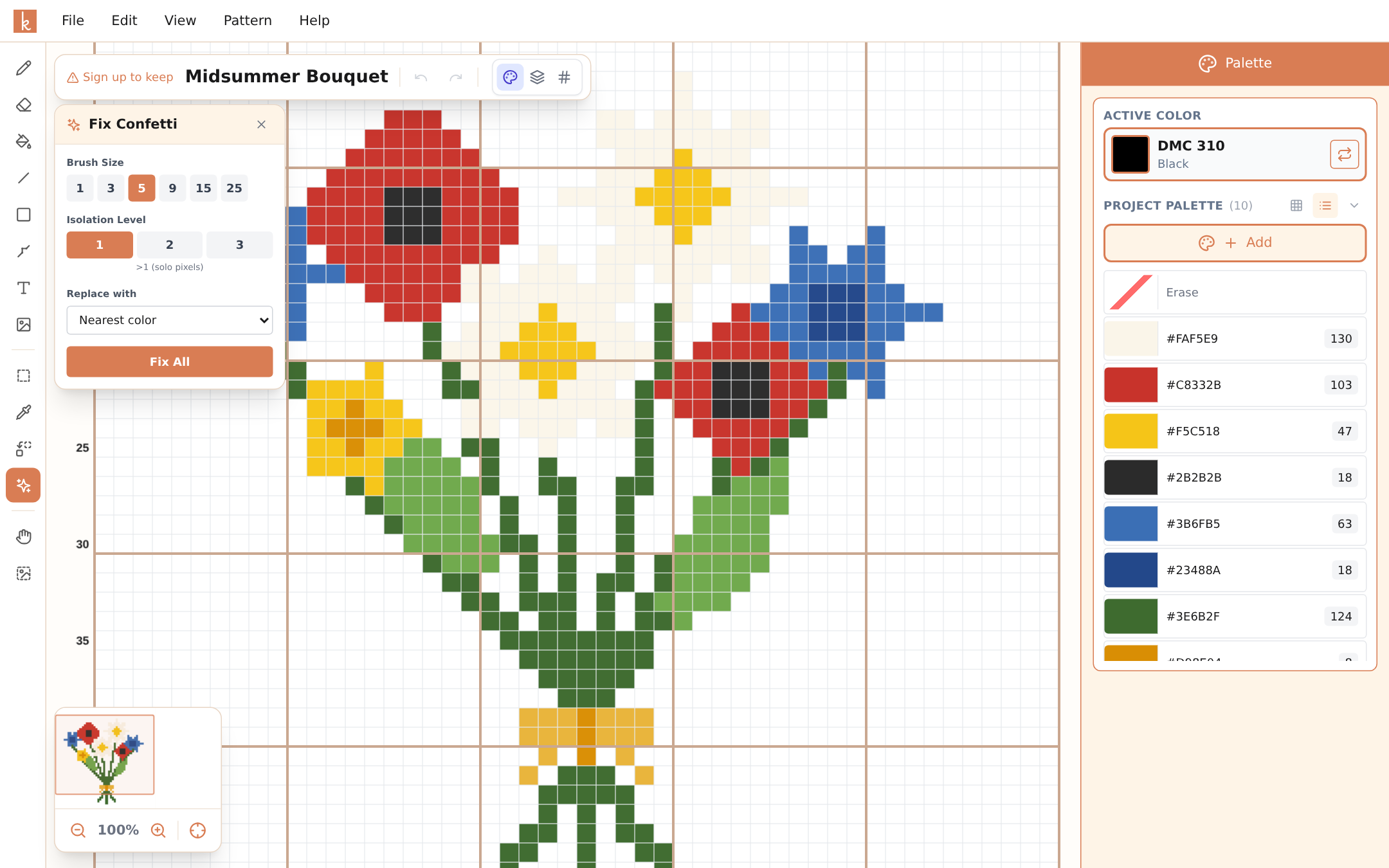
Confetti is the name stitchers give to scattered lone stitches — a single stitch of beige in a sea of brown, three thread changes for one row. Each one means stopping, re-threading, anchoring, and snipping for a single X. A photo conversion with heavy confetti can take twice as long to stitch as a clean chart of the same size, which is why this is one of Knytstudio’s most loved tools.
Using it
Select Fix Confetti in the tool rail and a panel opens with the controls:
Isolation level decides what counts as confetti: level 1 finds completely solo stitches, level 2 also catches isolated pairs, level 3 small clusters.
Replace with decides what happens to them. Nearest color blends each confetti stitch into its surroundings — the right choice almost always. You can also replace with your active color, or erase them entirely.
Fix All applies the cleanup to the whole pattern in one click. Watch the stitch counts in your palette drop.
The brush is for surgical work: pick a brush size (1 to 25 stitches wide) and paint over just the areas you want cleaned — calm down a noisy background while leaving the detailed eyes of a portrait exactly as they are.
When to run it
Right after a photo import or a Design Spark generation, and once more before exporting. Cleanup, then backstitch, then export — that order gives the cleanest result.
Your future self, four evenings into stitching the background, will thank you.
Frequently asked questions
What exactly counts as confetti?
Isolated stitches surrounded by other colors. You choose the threshold: level 1 targets single solo stitches, level 2 also catches pairs, level 3 catches small clusters.
Will cleanup ruin the details of my pattern?
Replaced stitches take the nearest surrounding color, so shapes stay intact — the pattern just loses its noise. And it is one undo away if you disagree with a change. For full control, use the brush on just the areas that bother you.
Why do photo imports have confetti at all?
Photos contain subtle color gradients. When they are reduced to a limited palette, border areas sometimes land on lone in-between colors. Every conversion tool produces some of this; the difference is whether you can clean it up.
Try it yourself
The Knytstudio editor is free to use in your browser. No install, no signup needed to start.
Open the editor