
Creating Patterns
Backstitch
Add outlines and fine details over your cross stitch chart with three backstitch modes: line, pen, and erase. Included in every export.
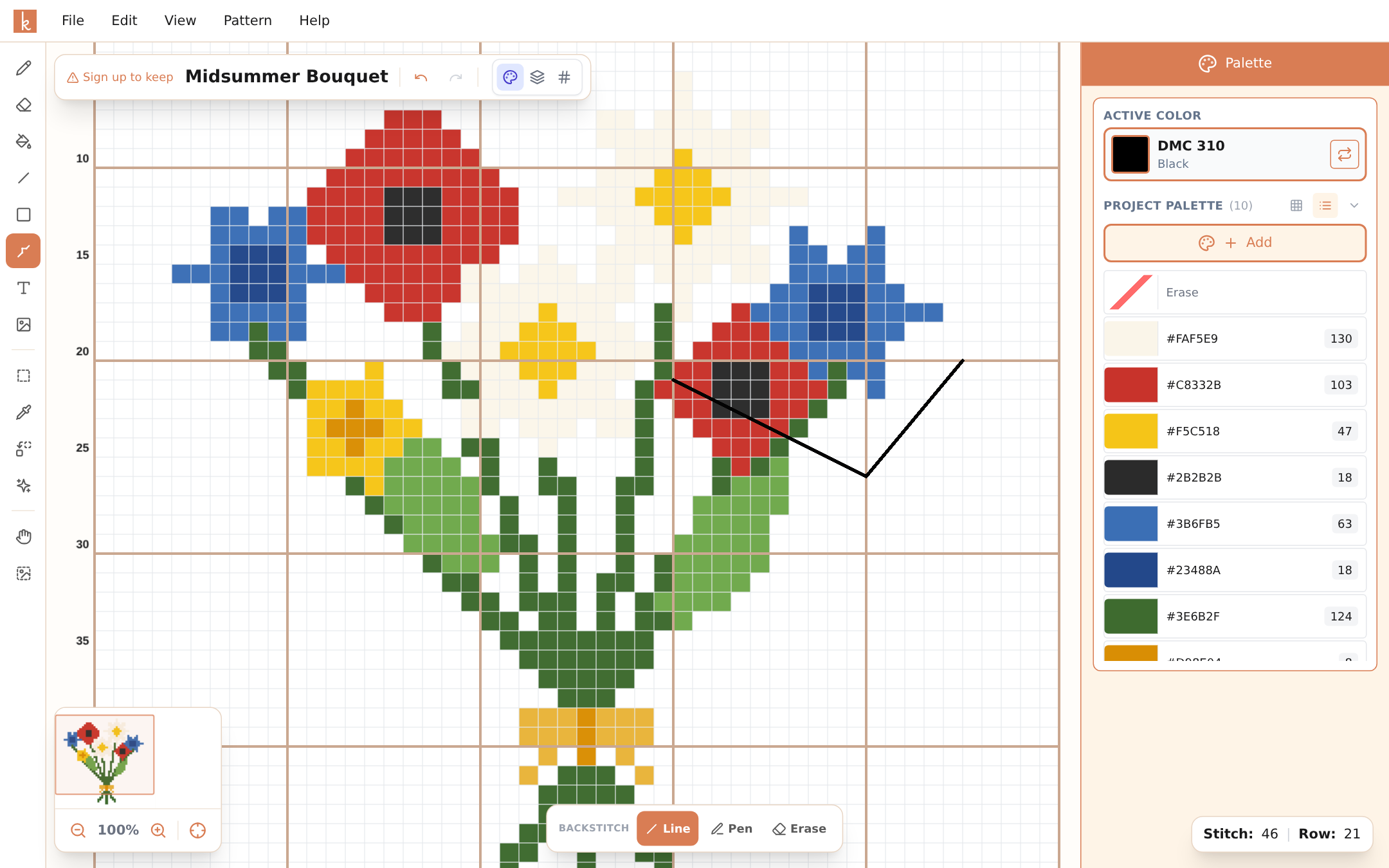
Cross stitch fills shapes; backstitch gives them edges. An outline around a figure, whiskers on a cat, lettering details — backstitch is usually the difference between a chart that looks flat and one that looks finished.
Select the backstitch tool in the tool rail (cross stitch patterns only) and the options bar offers three modes:
Line is the precise mode. Click where the stitch starts, drag to where it ends, release. Endpoints snap to the grid intersections, exactly like real backstitch lands in the holes of your fabric. Each segment can run horizontally, vertically, or diagonally — including longer stitches across multiple cells.
Pen is the fast mode. Draw freehand and Knytstudio lays down connected backstitch segments along your path, snapping each one to the grid as you go. Outlining a whole figure takes one fluid motion instead of forty clicks.
Erase removes segments — click one, or drag across several.
Backstitch uses your active color and records its floss code, so the legend in your exported chart tells you exactly which thread to outline with. A classic look is fills in color plus outlines in a dark shade like DMC 310, but nothing stops you from outlining petals in red and leaves in green.
Working over the chart
Backstitch lives on its own layer above the crosses: drawing and erasing backstitch never touches the stitches underneath, and editing stitches never disturbs your outlines. Undo covers backstitch like everything else.
A workflow that works
Finish the cross stitch design first, run confetti cleanup, and add backstitch as the final pass. Outlines drawn against a settled design land where they should the first time.
Frequently asked questions
Does backstitch show up in exports?
Yes, everywhere: PDF charts (on every page it crosses, plus the legend with floss codes), OXS files for other software, and image exports.
Can backstitch lines be diagonal?
Yes. Backstitch snaps to grid intersections but runs in any direction between them — diagonals, long stitches across several cells, whatever the design needs.
Is backstitch available on the free plan?
Yes, fully included for cross stitch patterns on every plan, phone and desktop alike.
Try it yourself
The Knytstudio editor is free to use in your browser. No install, no signup needed to start.
Open the editor