
Canvas & Pattern Work
Selections, Copy and Paste
Select an area, or every stitch of one color, to copy, move, recolor, crop, or delete it — the fastest way to build borders and rearrange a design.
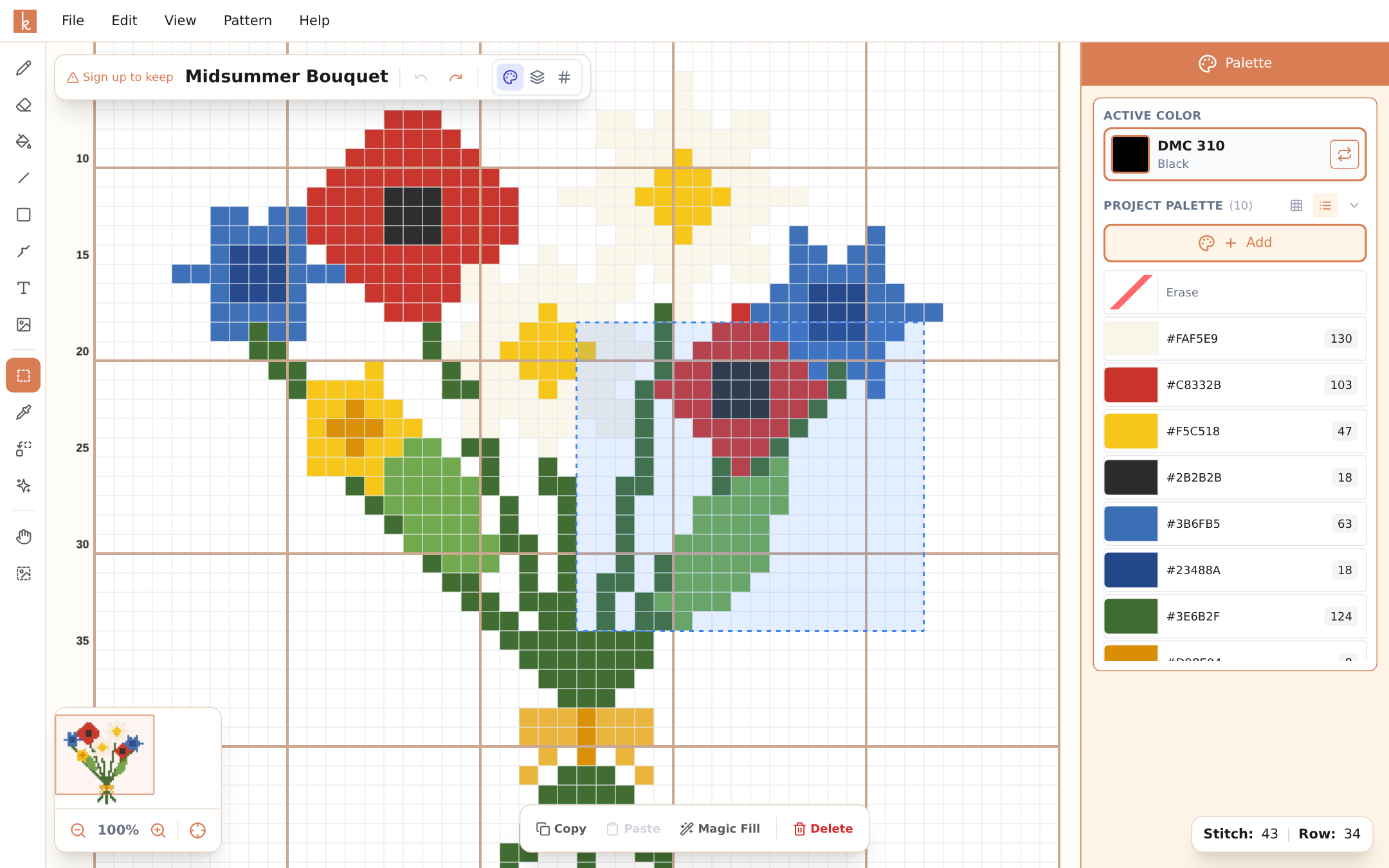
The Select Area tool (M) is the editor’s workhorse for anything bigger than a single stitch. Drag a rectangle over part of your pattern and the options bar offers the actions: Copy, Paste, flip, rotate, Duplicate, repeat, replace color, Crop, Magic Fill, and Delete. Right-click the selection for a menu that also has Cut. On a phone, Select Area is behind the three-dot button at the end of the tool column, and the actions appear in a small menu above the selection.
Select by color
Not every motif is a rectangle. Select by color (W, the wand just below Select Area on the tool rail) selects stitches by their color instead. The options bar sets how much one click takes:
- Connected selects the stitches of that color that touch the one you click, side by side or above and below. Stitches that only meet at a corner are left out. One petal, one letter, one patch of sky.
- All of this color selects every stitch of that color in the whole pattern.
- Add makes each click add to the selection instead of starting a new one. On a keyboard, hold Shift while you click.
Clicking an empty square selects nothing. On a phone, tap the three-dot button in the tool column and choose By color; Connected, All of this color, and Add sit in the strip above the canvas. On desktop you can also right-click a color in the palette and choose Select This Color.
What you do next applies only to the selected stitches: drag them, copy, cut, delete, flip, rotate, repeat, replace a color, or Magic Fill. Crop is the exception: it crops to the rectangle around the selection.
Repeating motifs
Chart one snowflake, copy it (Ctrl+C), and paste it (Ctrl+V) across the canvas. Each paste places a fresh copy that you position with a click. A sampler border that would take an evening to chart stitch-by-stitch takes a minute this way.
For an even border, let the options bar do the counting: Duplicate places one copy right beside the selection, and the two repeat buttons (×3 → and ×3 ↓) lay three copies edge to edge to the right or downwards.
The same trick handles mirroring a half-finished symmetric design, moving a motif that landed two stitches too far left, and lifting a detail from one corner to reuse in another. To mirror, select the copy and flip it left and right.
Deleting in bulk
Select and delete clears an entire region in one action — much faster than the eraser for removing a background or scrapping a corner that did not work out. It is a single undo step, so Ctrl+Z brings the whole region back.
Replacing a color in one part only
With an area selected, Replace Color asks Where: Whole pattern or Selection. Opened from a selection, it starts on Selection, and the list of colors to replace shows only the colors inside it. Turn one rose a deeper red and leave the others as they are.
Open it from the replace button in the options bar or the phone selection menu, or right-click a stitch inside the selection and choose Replace in Selection. On desktop, right-clicking a color in the palette offers Replace in Selection too.
Cropping to a selection
To trim a pattern down to one part, select what you want to keep and choose Crop in the options bar, Crop to selection in the Edit menu, or Crop to Selection in the right-click menu. On a phone, use the crop button in the selection menu. The pattern becomes the selected rectangle: everything outside it is removed, and backstitches inside move with their stitches. Ctrl+Z brings back the full pattern.
If you have already started stitching, tracker marks inside the kept area stay on their stitches and marks outside it are dropped. Crop is not offered on the charts of a knitted garment, such as a sweater.
Copying between patterns
The copy stays on the clipboard when you open another pattern, and a pattern in another browser tab can paste it too, so you can lift a motif from one design and drop it into the next. Its colors join the new pattern’s palette. Paste into a fuse bead pattern and colors that are not among its beads are matched to the nearest bead; bead colors pasted into a cross-stitch pattern are matched to the nearest thread. A short note says how many colors were matched.
Magic Fill
The Magic Fill button in the selection options deserves its own page: it draws a brand-new figure into the selected area from a written description. It needs a selection of at least 16 by 16 stitches. See Magic Fill.
Keyboard habits
Selections are where the standard shortcuts pay off: Ctrl+C copy, Ctrl+V paste, Delete to clear, Ctrl+Z when the paste landed one row off. With those four in muscle memory, rearranging a pattern feels like editing text.
A few more: M picks Select Area and W picks Select by color, Shift+click adds to a color selection, Shift while dragging keeps a move on one row or column, Ctrl+A selects the whole pattern, and Ctrl+D or Esc deselects. On a Mac, use Cmd instead of Ctrl.
Frequently asked questions
Can I paste a motif multiple times?
Yes — copy once, paste as many times as you like (Ctrl+V), placing each copy where you want it. That is how borders and repeating patterns are built in seconds.
Does copying include backstitch?
Copy and paste works on the stitches. Add backstitch after the layout is settled — it is the natural last step anyway.
Can I move a motif that's in the wrong place?
Yes. Select it, then press inside the selection and drag it to where it belongs; hold Shift to keep it on the same row or column. Or copy it, paste it in the right place, then delete the original selection.
Can I select every stitch of one color?
Yes. Pick Select by color (W), choose All of this color, and click any stitch of that color. On desktop you can also right-click the color in the palette and choose Select This Color.
Can I copy a motif from one pattern into another?
Yes. Copy it, open the other pattern, and paste. The copy is still there when you switch patterns, and its colors are added to the new pattern's palette.
Try it yourself
The Knytstudio editor is free to use in your browser. No install, no signup needed to start.
Open the editor